


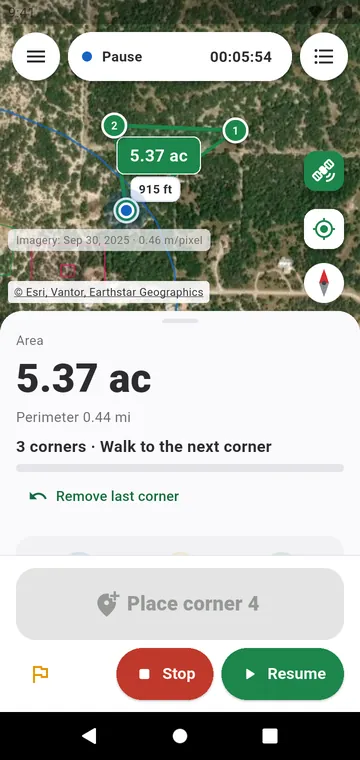
Why it is more precise
Walking around a field adds up every wobble of the GPS. Standing still at a corner does the opposite: the app collects fixes for several seconds and averages them, and the error circle shrinks as they come in. The area is computed from the corners only — the way you walked between them does not count.
How to do it
- Choose Corner by corner in the panel at the bottom of the map.
- Walk to the first corner and stand still. When the position has settled, tap Place corner 1.
- Walk to the next corner. As soon as you move, the average starts again from zero, so your walk never weighs on the next corner.
- From the third corner on, the area and the perimeter are shown live. Remove last corner takes back a mistake.
Good to know
- Keep the phone in the open, away from walls and trees, while the corner settles.
- A corner-by-corner measurement can be resumed later to add corners.
- Its corners can be snapped to when you draw a neighbouring plot on the map.